Archivo
Vatuta 0.5.1: some technical debt improvements
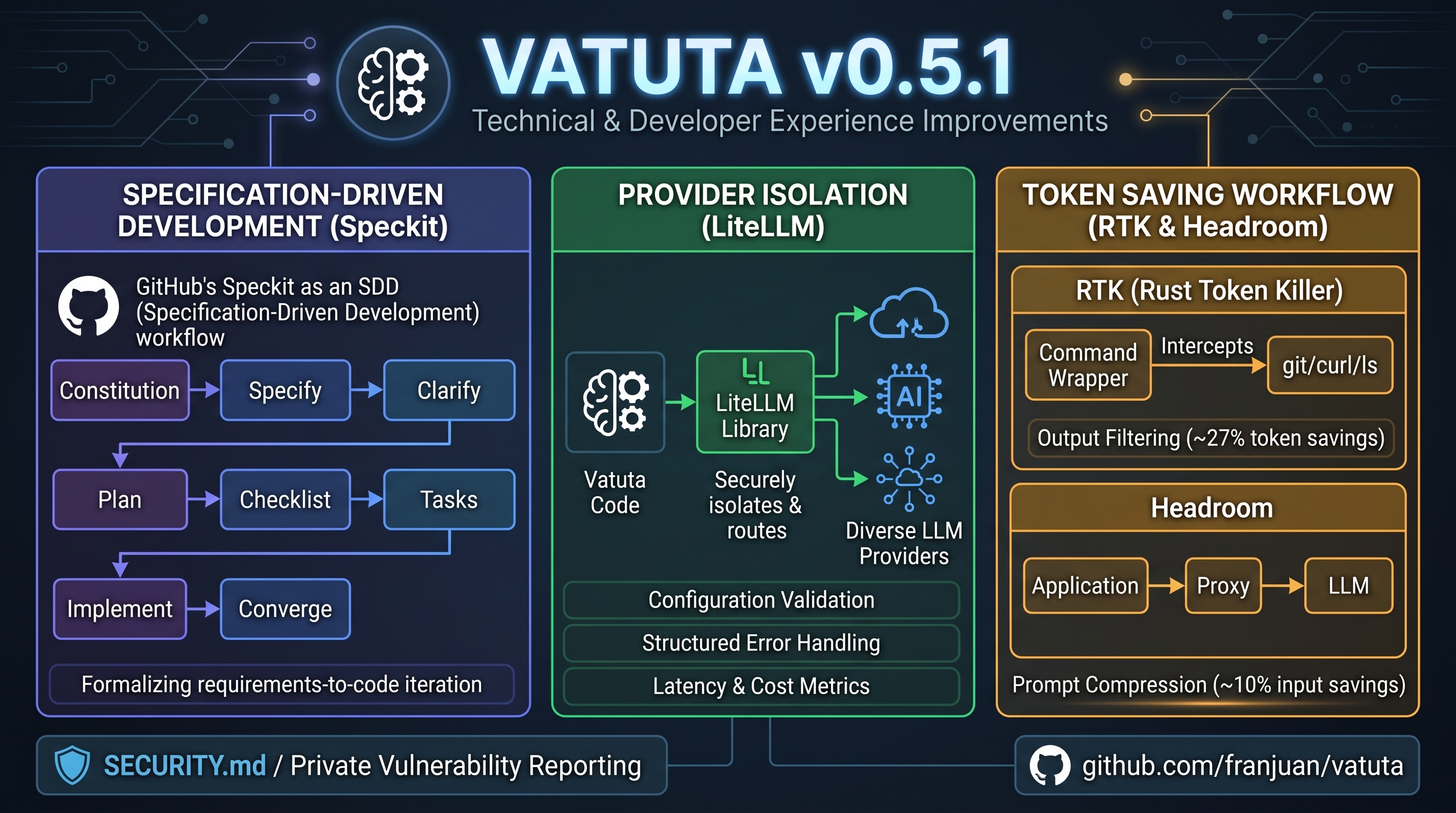
This version of Vatuta does not contain major new end-user features, but it does include several technical and operational improvements, many of them focused on enhancing the developer experience.
- The most relevant one is the use of Speckit as a Specification-Driven Development (SDD) tool.
- The LiteLLM library has been integrated to isolate the project from the model provider.
- I also added other token-saving tools to my development workflow, like RTK and Headroom, to reduce the prompt size and save token costs.
Speckit
Speckit by GitHub is a Specification-Driven Development (SDD) tool. It helps to formalize the process from requirements to implementation when an agent develops a feature.
This is something we can do through prompts: we can use a more or less refined prompt to define the feature description, then make design decisions and plan the implementation. If the requirement was not complete enough or if we didn’t get the expected result, we can then iterate with additional prompts. We eventually get to the expected goal.
Speckit creates a flow for this process with a sequence of stages or steps to follow. Based on agent skills, it tries to ensure that a formal requirements collection and implementation process is followed to achieve a goal. Every step has its own command or skill that guides the agent through the corresponding stage.
The steps or stages (each supported by its own command or skill) in the flow are:
- Constitution: It is only done once per project (although we can iterate in the future). Similar to AGENTS.md, it sets the principles, rules, and limits of the project.
- Specify: Defines and creates a new feature. It defines the what and the why, the business use case and the acceptance criteria.
- Clarify: Reviews the feature specification and asks for clarification on ambiguities or edge cases.
- Plan: Translates the specification into an architecture, technological stack, a design, and their dependencies.
- Checklist: Allows human verification of the process by creating checks that a reviewer can use to validate the quality of the requirements.
- Tasks: Breaks down implementation into a list of ordered tasks and dependencies.
- Analyze: Validates the integrity and coherence between all the former steps.
- Implementation: The agent performs the implementation following the steps in the task plan.
- Converge: Checks the implementation against the specification, plan, and tasks, identifying any remaining work.
The benefit is that the whole process of collecting requirements and implementing them is documented. This helps ensure that a formal procedure has been followed and that the process itself is documented and part of the release for future reference.
In my personal experience, it helped me to think about and prepare the requirements in an ordered manner, instead of launching prompts with no plan as I did before. The planning stage is where most of the magic occurred: making technical decisions, defining interfaces and contracts… Thinking about these topics at this stage is much better than asking the agent to redo work or change its mind about a topic it had already decided on earlier in the process.
On the other hand, the process requires some time, even some hours per requirement. And every change in the later stages requires synchronization with all the previous stages, which can be slow and repetitive.
LiteLLM
Although Vatuta already supported several model providers, it did so in a custom manner. There are already solutions like LiteLLM that, as a library or proxy component, handle the isolation and integration of the model providers. As it supports most LLM providers and is quite mature, it makes sense to replace legacy integration with LiteLLM.
The integration uses LiteLLM as a library/dependency in the code. And Vatuta’s config file has been slightly modified to adapt to LiteLLM’s model configuration.
In addition to integrating the library into the application logic, this version provides configuration validation and checking, a structured error model for LLM operations, and metrics on the number of calls, their latency, and token consumption.
RTK and Headroom
As LLM models are able to work with longer contexts and the tasks invoked by agents become more complex, the number of tokens used increases and becomes an important concern. The tools and commands agents usage produce verbose and sometimes unnecessary information that is included in the agent’s context with no filtering or summarization.
Several tools exist to save tokens and reduce context length. RTK and Headroom have been integrated into the project.
RTK (Rust Token Killer) works as a wrapper for most of the terminal commands the agent invokes, filtering and extracting only the relevant information for the agent. It works with commands such as ls, git, curl, and grep. When properly configured, RTK intercepts supported commands, captures their output, and transforms it before it reaches the agent. In my experience, the reduction in token usage is around 27%, but this reduction only applies to the output of such commands, not the whole prompt.
Headroom works as a proxy between the application and the LLM endpoint (in our case, the coding agent and the LLM provider), capturing all the requests and compressing the prompts. It requires a service to be run as a proxy between the application and the model provider endpoint, capturing all the prompts. Headroom then classifies the content of the prompt, detecting the content type in the prompt and applying a different compressor depending on the type. Headroom also supports recovery of the original compressed content through its CCR mechanism. Additionally, it offers a failure-learning feature to analyze previous coding sessions and extract lessons from them. It may also modify prompts (similarly to how the caveman skill does) to encourage the model to produce shorter responses, so the output also uses fewer tokens.
I used one of the most conservative settings of Headroom and achieved a 10% saving in input tokens. This is much smaller than the saving achieved with RTK, but all the tool responses included in the prompts had already been compressed by RTK before Headroom processed them, and Headroom’s compression is applied to the whole prompt, not only to those tools’ responses.
Although the savings are not close to the figures mentioned on the project websites, they are quite interesting, and these tools are a very good way to save some tokens, which may reduce the cost of the project or avoid reaching model consumption limits. Reducing token consumption does not always imply cost savings, as the caching strategies on the model side may be impacted by this compression.
The configuration of these tools is not part of the repository, as the philosophy of the project is to remain as independent of specific tools and agents as possible. However, some RTK usage guidelines are included in the project documentation.
Special thanks to Alberto Roig for all the expertise and advice on this subject 😃
Security.md
SECURITY.md file has been added to the project to define a policy for reporting security vulnerabilities to the maintainers. The GitHub Private Vulnerability Reporting feature has also been enabled to allow confidential communication of vulnerabilities.
After the nightly CI run, I am normally aware of any known vulnerabilities detected by dependency audit tools or static code analysis. The main branch and the latest release are kept up to date through minor releases that fix such vulnerabilities. Fixes normally arrive within days.
Version 0.4.x
If you missed version 0.4.x, that’s a mistake on my side. There is no such version 😉


