Archivo
Vatuta 0.3.0: Supercharging RAG with MCP Tools and hardening with Container Sandboxing
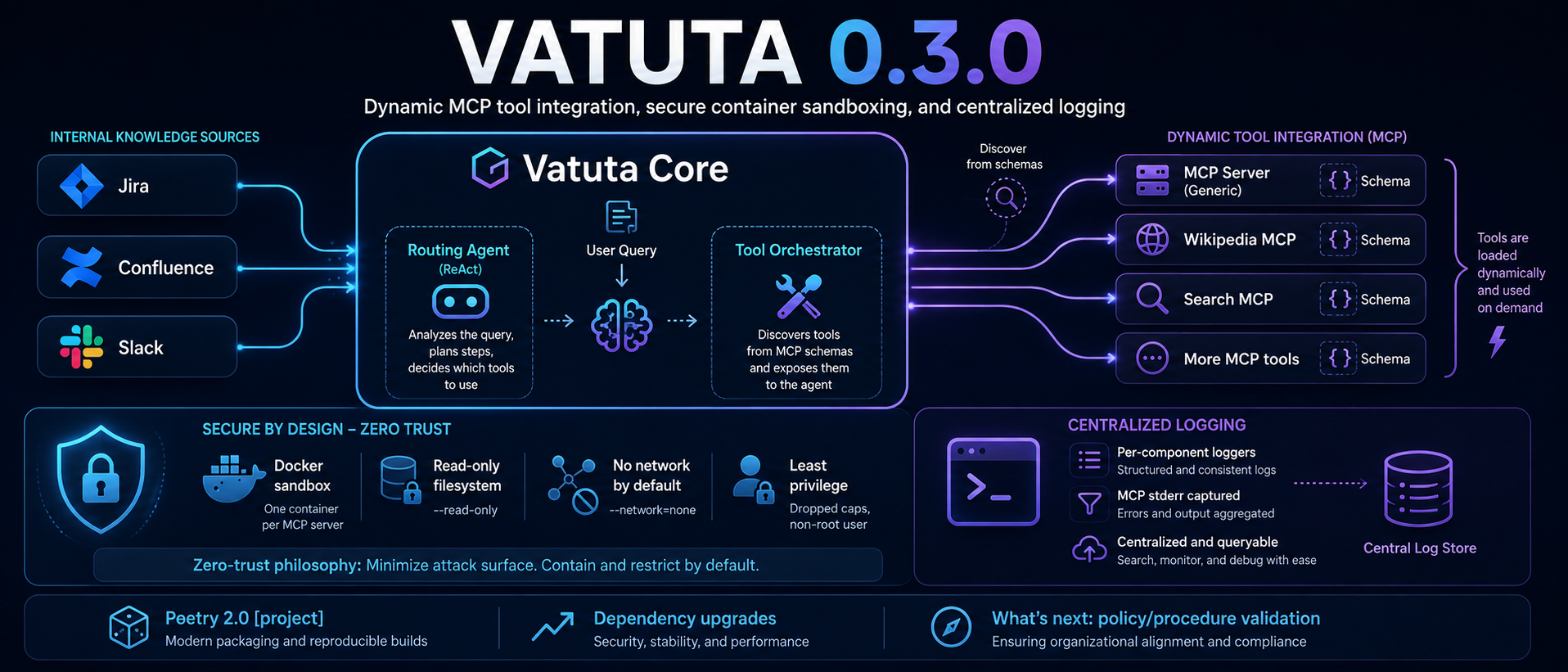
1. Introduction and motivation
Vatuta already supports integration with JIRA, Slack, and Confluence sources for both the ingestion and indexing mechanisms and the query analysis mechanisms. In the first case, the events and contents of the sources are indexed in order to be collected by context and term (a hybrid approach is used). In the second case, when the user’s query is analyzed, specific data from sources may be collected and added to the context of the response, like JIRA tickets, Confluence articles, or Slack conversations.
But the context for the response may include more relevant or useful information to answer the user’s question: information retrieved from external sources, real-time data specific to the moment the question is asked, data queried on the fly, information calculated or summarized from the sources… These kinds of data are not available in the current model/architecture of the RAG, either indexed by context or by term.
In the previous version, we already supported some of these features by adding tools during the analysis of the user’s query. This analysis is a routing agent that, using the tools available to it, iterates, collecting the needed information for the context until it decides that no more information is needed or reachable. This process is dynamic, depends on the user’s question and the available tools, and performs independently without user interaction. By providing tools to this process, we allow the process to collect more information or relevant data.
The challenge is how to add tools without adding the complexity and effort of implementing and maintaining them. Every single tool may have dependencies on the external source or system, so the maintenance complexity grows linearly with the number of tools supported. This problem is not sustainable, even more so due to the nature of this project.
The ideal solution would:
- Be isolated and connected through some interface, so it is not part of the software development life cycle of Vatuta
- Ideally, the MCP server should be maintained by the owner of the source or by a trusted community/vendor, so changes in the external API are handled closer to the source, and the maintenance effort does not rely on Vatuta
- As it is external code, it may not be trustworthy, and we should be able to run it in an isolated and secure manner
- The integration and invocation must be dynamic, based on configuration only, not requiring any change to Vatuta’s code
MCP is a natural solution for this kind of integration problem. Introduced by Anthropic, MCP provides an open standard for LLMs to securely interact with external tools and data sources. MCP servers provide operations and resources as an interoperability layer with external or third-party systems or data sources. MCP standardizes how tools, resources, and prompts are exposed, including their names, descriptions, input schemas, and outputs, so the agent can decide which capabilities may be useful.
An MCP server is an instance that runs independently, providing the implementation and functionality through the MCP interface to a client, an agent. If the functionality relies on a third party, the MCP server also manages the communication with it. The MCP ecosystem is growing quickly, and servers are already available for many common services and data sources. This is a great advantage to avoid the implementation and maintenance effort, but also a great risk, as it may be untrusted code manipulating our data, adding dishonest data to the context, or even operating on these third-party systems on our behalf.
An MCP server provides the client with tools (callable operations), resources (static content), and prompts (prepared prompt templates for LLMs). The client may provide, if desired and enabled, access to roots/files or allow the MCP server to request LLM sampling through the client. In our implementation, Vatuta only supports MCP tools exposed by the server.
2. Dynamic tool integration: How MCP works in Vatuta
MCP servers are set up in the Vatuta configuration. There are no code-specific or platform requirements, except Docker. Vatuta itself identifies the MCP Docker image and creates a container to run it.
After the MCP server instance is started, Vatuta connects to configured MCP servers, queries their tool catalogs (list_tools), and automatically converts JSON Schema metadata into typed Pydantic models for DSPy tools (MCPToolWrapper). That means that the tool arguments, their schema, and return value are dynamically loaded and interpreted in order to make them available to the routing agent that analyses the user’s query. If the MCP server provides new tools or argument logic, they will be updated in the next Vatuta start.
The routing agent that analyses the user’s query is a ReAct agent that iterates in a multi-step strategy through the query, collecting data from the different tools and applying filters to the RAG query (the filter applications are also tools) until all the information needed is collected by the available tools. The agent knows the list of tools, but also the arguments to call them and the expected response, so it can guess which tools are useful and how to call them.
There is the temptation to add as many tools as possible in order to enable more functionality to the agent, but this will cause the agent to manage so many tools that its efficacy in selecting the right tool decreases. Until a mechanism that manages this issue is applied, it is very important to just enable the tools that are needed. Therefore, a Regex-based whitelisting allowed_tools ensures that only explicitly allowed capabilities are exposed to the agent. This reduces the attack surface, although it does not make a tool safe by itself.
The routing agent persona was refined so it seamlessly orchestrates both internal RAG document filters (Jira/Confluence/Slack) and external MCP tools in multi-step trajectories.
The standard MCP transports are stdio and Streamable HTTP. For this implementation, I selected stdio: the standard input stream (stdin) is used for the client to invoke the MCP server, which answers through the standard output stream (stdout), both on the Docker process running the container. The standard error stream (stderr) shows error messages to the client, Vatuta. The asynchronous Docker stdio sessions (stdio_client) were also integrated into the synchronous LangGraph nodes & DSPy ReAct routing (AsyncLoopThread).
In the example configuration, two MCP servers were integrated as an example:
mcp/everything, a common MCP sample server and itsaddtoolmcp/wikipedia-mcp,a Wikipedia search and content-collecting MCP server and itssearchandreadtools
3. Under the hood: Security and container sandboxing
MCP servers are third-party code and must be considered untrustworthy. The MCP server may be manipulating sensitive data from our context; it may have credentials and access to sensitive internal services and systems, and also inject data into the context. Therefore, the integration philosophy was based on a zero-trust approach.
The MCP servers are run in an isolated environment based on Docker in order to avoid running in the same environment as the host running Vatuta. The MCP transport protocol selected is stdio to avoid exposing an HTTP endpoint and to keep communication tied to the container process. Network access is blocked separately with Docker’s --network=none by default.
Before running containers, the images are pinned to the image digest. If the image digest is used to identify the image in the configuration, such an identifier is used. If a tag were used, metadata is extracted first, and then the container is pinned to the digest related to this tag metadata. The images are not automatically pulled from the repository unless the pull parameter is enabled.
The container is run in a hardened Docker execution profile:
- Mounted in a read-only root filesystem (
--read-only) with ephemeral data in-memory/tmp(tmpfs). - With no access to the network unless it is explicitly enabled per server (
--network=noneby default, togglable per server). - Based on least privilege execution: Unprivileged user (
1000:1000), dropping all Linux kernel capabilities (--cap-drop=ALL), andno-new-privileges=true. - With strict bind mount validation: Read-only (
ro) mounts only, with strict path validation blocking host system directories (/,/etc,/var/run/docker.sock). - Secrets from Vatuta can be passed to the Docker environment (like third-party tokens) through environment variable pass-through (env_passthrough). Secrets should only be passed when strictly needed, scoped per server, and with the minimum permissions required.
This does not make third-party code fully safe, but it reduces the attack surface and limits the potential impact of a compromised or malicious MCP server.
The whole security philosophy is described in the project documentation.
4. Centralized Logging Architecture
The whole logging architecture has been unified, centralized, and refactored. In former versions, there was still process information shown with print calls, and it was not possible to set the level of logging per component.
The logging library has been applied to all source components, creating loggers with proper names to identify the source of every event. The use of lazy printf formatting has also been followed in all logging operations.
The centralized logging configuration file can be found at config/logging.yaml, and it contains the logging settings for the whole Vatuta, allowing the routing and filtering of events depending on the different components from a unique point.
The MCP container stderr output is captured and forwarded as logging events in loggers called external.mcp.[mcp server name].
5. Other version 0.3.0 highlights
- Poetry 2.0 Specification: Migration of
pyproject.tomlto the official Poetry 2.0[project]standards. - All dependencies have been upgraded to resolve the known vulnerabilities reported by the current dependency scan at the time of the release.
6. What’s Next
I am working on enabling Vatuta as a policy/procedure validator or enforcer. It is quite common that a manager’s work includes validating that the standards, procedures, and policies are followed. Vatuta can collect the needed data, evaluate the policies defined in natural language, and report whether there are violations.

 Bytes & Chips